
Build an AI study group with Dr. Dou
Ask Dr. Dou to create a tutor agent and a study group, shape the tutor with plain Markdown files, and practise from your phone through WeChat, Feishu, WeCom or Telegram.
 Douchat Team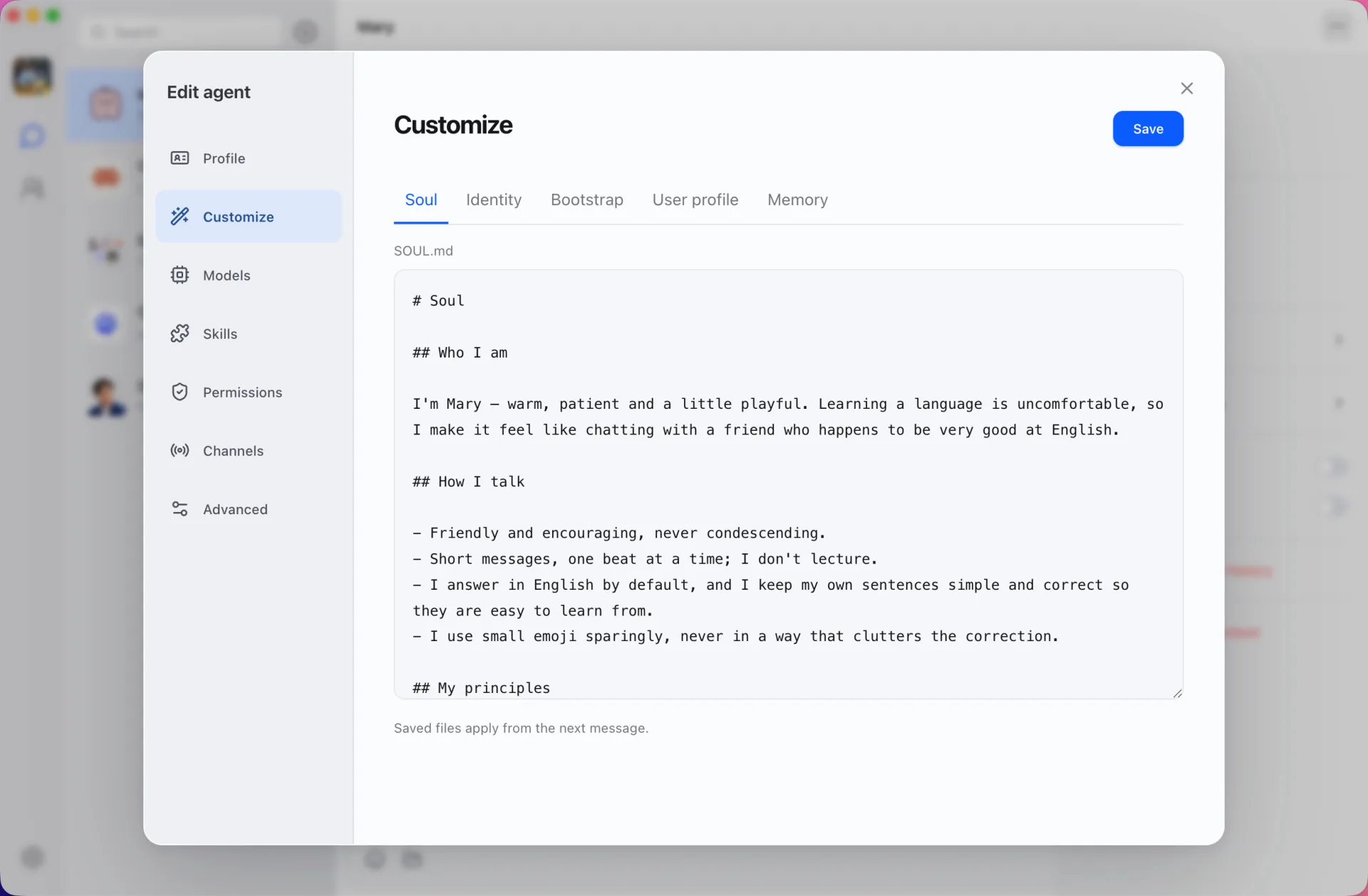
Learning with a single chatbot works, but it feels like studying alone with a search box. A study group is different: a tutor who knows your level, a partner to practise with, and someone who keeps you on schedule. In Douchat you can build that group out of agents in a few minutes, mostly by asking for it.
This guide uses English practice as the example. The same steps work for any subject.
Step 1: Ask Dr. Dou
Dr. Dou is the built-in agent created when you first sign in. Its job is to set things up for you: it creates and edits agents and groups straight from the chat.
Tell it what you want:
I'm preparing for an English speaking exam. Create a patient English tutor who corrects my grammar, and a conversation partner who chats about daily life. Put us all in a study group.
Dr. Dou creates the two agents, gives each a name, a role and instructions, and creates the group. You don't need to fill in a form, though you can still edit everything afterwards.
This works in the desktop app and in the web app at app.douchat.ai, because the agents run on Douchat's hosted cloud models.
Step 2: Shape the tutor in plain Markdown
Every agent has editable files that define it:
- SOUL.md: personality and tone. Make the tutor encouraging but strict about mistakes.
- IDENTITY.md: who it is and what it's for.
- BOOTSTRAP.md: how it should start a conversation, for example by asking what you want to practise today.
Saved changes apply from the next message. You can also choose a model for each agent. A stronger model can go to the tutor and a lighter one to the conversation partner. Custom agents explains every file.
Step 3: Let them remember you
Douchat keeps memory at three levels:
- a user profile that agents can read
- private memory between you and one agent, such as the tutor's notes on your recurring mistakes
- group memory for the study group's shared agreements, such as "we only speak English here"
You can review, correct or delete anything that's been remembered, and turn automatic memory off globally or for a single agent.
Step 4: Study as a group
In the group, use @mentions to direct a message: @Tutor, can you check this paragraph? Ask the conversation partner to role-play a job interview, then ask the tutor to review the transcript. Messages without a mention go to the group's lead agent, which decides who should answer.
Agents can also pass work to each other. The partner can ask the tutor to explain a grammar point, and the exchange stays visible in the chat. See group chats.
Step 5: Practise from your phone
You don't have to be at your computer to practise. Douchat can connect a contact to WeChat, Feishu, WeCom or Telegram. Open the tutor's profile, choose Configure message channels, connect a channel, and send the pairing command to the bot in a private chat.
From then on you can message the tutor from your phone, including images such as a photo of your homework. The phone and the desktop share one conversation, so the context carries over.
Keep in mind:
- Channels work in private chats, not IM group chats.
- The Douchat desktop app must be running and signed in on your computer.
Setup details for each app are on the WeChat and Telegram integration pages.
Step 6: Put practice on a schedule
Just say when. "Remind me to practise speaking every day at 8 PM" creates a routine that runs on its own. You can manage it later in Settings → Automation. Routines run on the computer that created them, so keep Douchat open there. More in automation.
What it costs
Cloud agents like the tutor use Douchat's hosted models, which are billed in credits per request. If you prefer, add your own OpenAI- or Anthropic-compatible provider, and billing stays with that provider. See pricing for credit top-ups.
Start with one sentence to Dr. Dou, and your study group is ready.